A character can look convincing in one generated frame and still fail the next cut. The face changes slightly, the jacket gains a pocket, or rain-soaked clothes turn dry before the scene ends. The missing piece is an approved record of what should stay the same.
Separate three decisions: who the character is, what has happened to their appearance, and how this particular shot is filmed. Keep an approved reference for each lasting story condition, then check a still before asking a video model to animate it.
The images here are AI-generated examples of a fictional adult, created with Codex built-in image generation on 30 October 2026. We ran one reference-sheet generation and one rain edit. No video model or complete film was tested. This guide was prepared with AI assistance and editorial review.
Give identity, state and shot different jobs
Identity is the character design you intend to preserve: facial structure, apparent age, skin tone, hair and body proportions. Keep its approved master available even after creating later versions.
State records visible conditions that should continue into the next shot: damp hair, a muddy hem, a changed jacket or a missing accessory. An intentional haircut is also a new approved state; it should not become an excuse for an unrelated face change.
Shot describes the framing, pose, setting, lighting and performance. A camera move should not require redesigning the character. Write down which state the shot uses before generating it.
For example, a courier arrives in dry clothes, walks through rain, then enters a station. The station shot should use the approved wet state unless the story gives a reason for the clothes to dry. A brighter interior alone does not reset continuity.
1. Make a reference that explains the character
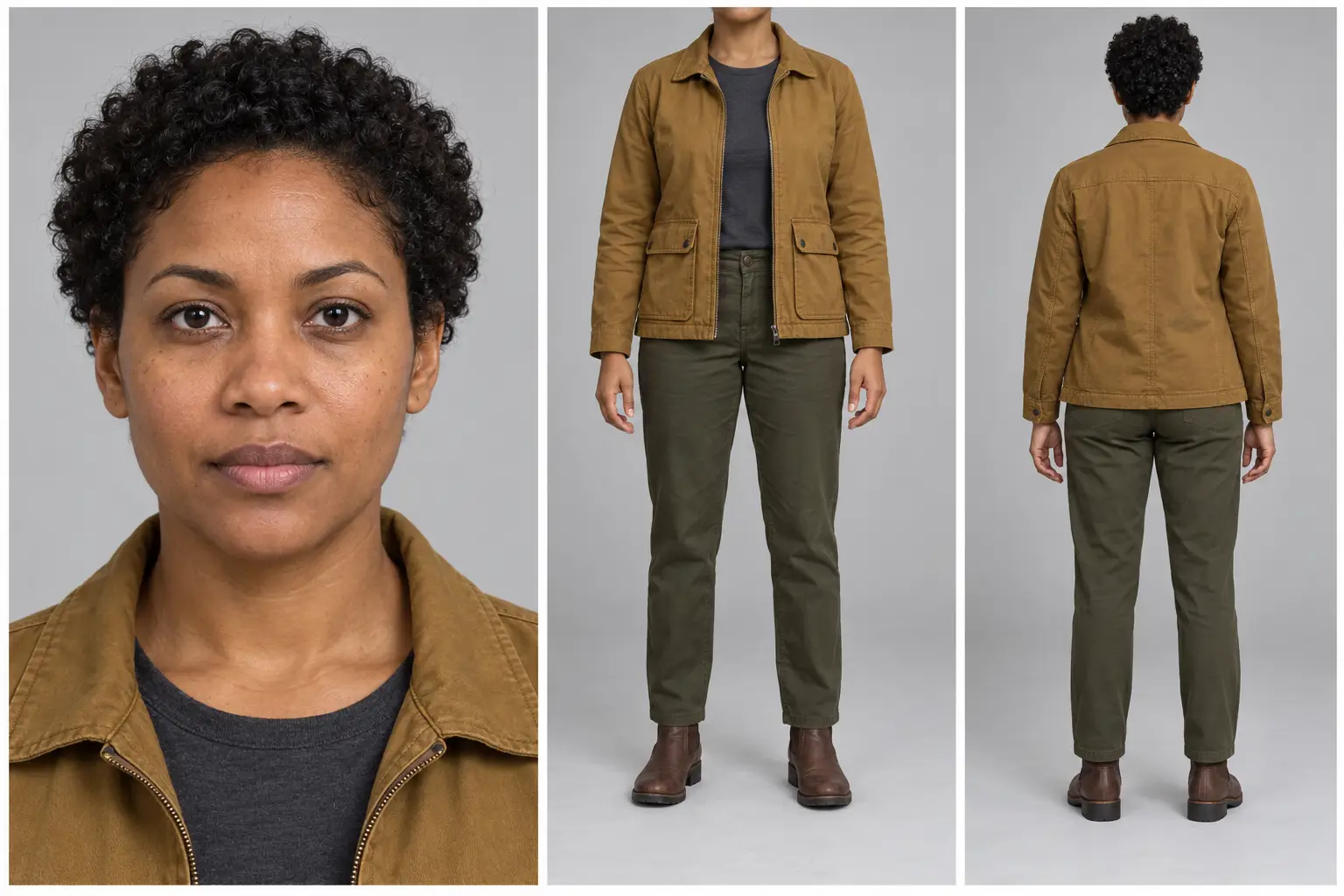
Start with a readable face close-up and front and rear costume views. Use a plain background and even lighting so you can inspect proportions, garment construction and accessories. The three-view arrangement below is a practical organizing choice, not a required format for every model.
Runway’s reference-image guidance recommends neutral expressions and even lighting, and describes saving generated results as references. That supports using a clean starting reference; it does not guarantee an unchanged character throughout a film.
Our character reference sheet prompt (CHAR001) supplies editable identity, outfit and visual-style inputs. Its recorded example uses an ochre field jacket, charcoal shirt, olive trousers and brown boots. Check that every view agrees before accepting the sheet.
A sheet cannot show everything. Add a separate side profile or expression reference when a planned shot needs it. A closed-mouth portrait does not establish teeth, and a rear view does not confirm facial identity. Keep additions relevant rather than packing every possible pose into one small image.
2. Version the condition, keeping the master
When a visible story change must persist, edit the last approved state and compare the result against the identity master. Save both. Avoid a chain in which every new output automatically becomes the next reference, because that also carries forward mistakes.
The character state update prompt (CHAR002) requires the approved sheet as an attached image. For the recorded edit, we requested water beads, damp curls, wet patches on the jacket shoulders and sleeves, and a little mud on the boot soles. The reference image is part of that input; copying the text alone does not repeat the test.
Base sheet — generated from text.
A fictional character, shown with a face close-up and front and rear costume views. The front panel includes a sliver of chin above the intended neck crop.
Rain state — edited from the base sheet.
The rain edit broadly preserves the face, costume and layout. Mud spreads beyond the boot soles and the trousers acquire additional darkening and surface marks; the curls remain fairly full. These are generated examples, not real photographs.
This edit illustrates a useful distinction: recognizable identity and correct story condition are separate checks. The face and costume can broadly match while unwanted mud or fabric changes still break the planned sequence.
Those differences matter more than whether the picture looks polished. If clean trousers are essential to the next shot, correct the edit before accepting it. “Tested” on these prompt pages means the displayed inputs were actually run and inspected; it does not mean every instruction passed or that facial identity was measured.
3. Keep a small continuity record
You do not need a production database for a short sequence. A shared note can identify each approved file and the shots allowed to use it. For the courier example, a proposed record could read:
- Mara_master: approved identity and base outfit; retain as the design reference.
- Mara_S01_dry: dry jacket, clean boots; used for the approach to the station.
- Mara_S02_rain: approved wet patches and agreed mud placement; used after the walk through rain.
- Shot_03: station entrance, medium close-up, S02 rain state, looking toward the platform.
These filenames and the station sequence are planning examples, not additional generated tests. Give rejected variants a separate place so an attractive but inconsistent frame is not mistaken for the approved state.
Record exactly what changed and what must carry forward. “Wet” is less useful than “darkened jacket shoulders, damp curls and muddy boot soles.” If you intentionally change the outfit later, state which earlier conditions remain.
4. Approve the shot as a still
Attach the relevant character reference and describe one camera setup. Check face, outfit and current condition before moving to animation. Keep the environment reference separate when the location also needs continuity.
Here is an untested still direction to adapt after approving the rain sheet:
Use the approved rain-state character reference. Create one medium close-up at eye level inside a quiet railway station. The character looks toward the platform. Keep the established face, short curls, ochre jacket design and approved damp patches. Use soft window light. No new accessories or costume changes.
Read your tool’s input controls carefully. A multi-panel character sheet is a design reference; it is usually a poor choice for the first frame of a single cinematic shot. Use the approved shot still for that role. Google describes reference-image and frame controls for Veo, but that does not mean every app exposes the same inputs or treats them interchangeably.
5. Animate the action, then inspect the clip
Once the still is approved, give the video model a small, clear action. Runway’s image-to-video guide explains that the input image supplies visual information and the text should focus on motion. A possible untested direction is: “The character turns slowly toward the platform as the camera gently moves closer. One continuous shot.” Choose duration in the tool’s settings.
Compare the opening, middle and ending frames against the approved still, then watch the full clip for changes between those checkpoints. Look for shifting facial features, disappearing pockets, changing hair length, drying fabric and accessories that swap sides. Inspect hands and body structure during motion as well.
If the opening is already wrong, return to the still. If only the moving clip drifts, try a simpler action or shorter shot before changing the approved character design. These are troubleshooting choices, not a promise that a particular model will preserve identity.
Accept a frame as a new reference only after it passes the same checks as the original. A good-looking ending is not automatically a reliable starting point for the next scene.
Sources
- Creating with Gen-4 Image References — Runway
- Image to Video Prompting Guide — Runway
- Veo: reference images and creative controls — Google DeepMind