A photo-to-caricature prompt has to do two jobs at once: ask for an obvious exaggeration and tell the image tool which facial details should still read as the same person. Those instructions guide the result; they do not guarantee an exact likeness.
This guide was prompted by a big-head character carousel from @akodito.ai. The post presents nine varied characters and expressions, labels a sample prompt for ChatGPT Image 2.5, and identifies a creator partnership with SYNTX.AI. The caption also advertises a partner discount. Techotick has no relationship with either company and uses none of the carousel artwork or its full prompt text.
Start with the reference, not a style pile
In ChatGPT, you can upload an existing image and describe the change you want. OpenAI’s image guidance recommends being specific about the subject and visible details, identifying what an edit should change and what should stay, and refining one thing at a time. That gives you a simple brief to work from.
Use one clear portrait of an adult, with the face visible and not hidden by a strong shadow, hand or another person. Use a photo you own or have permission to edit. A busy reference can still work, but it gives the tool more competing details to reinterpret.
Separate the exaggeration from the likeness cues
Write the main request first: make a 3D caricature with a clearly oversized head and a compact body. Then list a few visible cues that matter, such as face shape, hairstyle, eyebrow shape, skin tone or glasses. Add the expression and pose separately. If clothing should carry over from the photo, say so; otherwise specify the outfit you want.
Keep the scene simple when the face is the focus. Name the crop, lighting and background, then exclude unwanted text, logos or extra people. Avoid asking for a dozen new props and a costume change in the same first pass. Each extra change gives the image more opportunities to drift away from the reference.
Use the reference-photo caricature prompt as a starting point. Its square-bracket fields let you set the visual treatment, head-to-body proportion, facial cues, expression, clothing, scene and framing.
Synthetic fictional reference
This adult face was generated for the example; it is not a real person or source photograph.
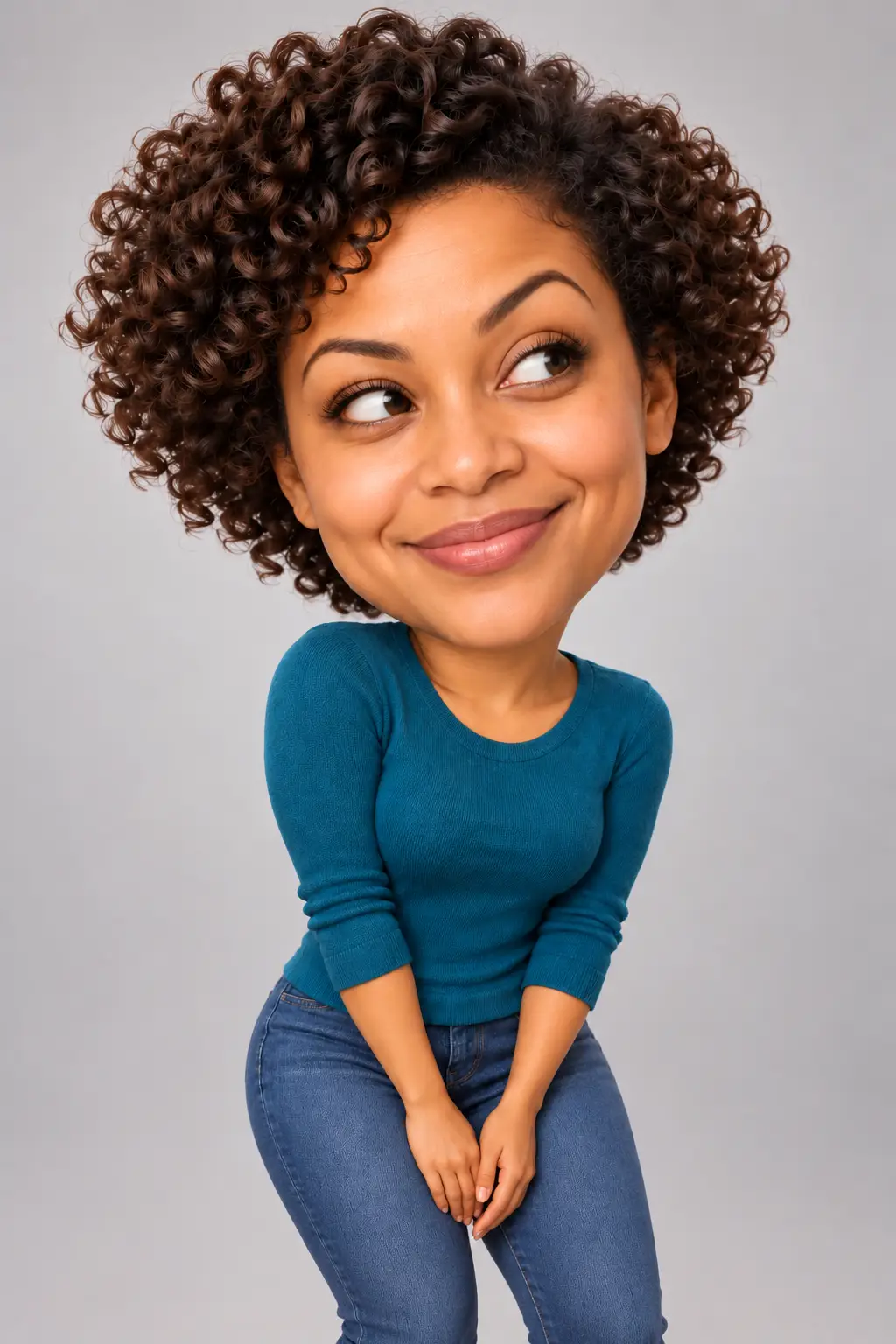
Generated caricature after a focused edit
The first render looked too natural. One follow-up asked for a larger head and compact body while preserving the face cues, expression, clothing and scene. This synthetic example does not prove real-person likeness accuracy.
Make one correction, then compare
In the generated example here, the first image kept the fictional woman’s curls, teal top and side-eye, but the head was not exaggerated enough. A second instruction changed head size and body scale while asking to keep the other visible details. The result made the caricature more obvious. This is a record of one synthetic-image run, not a claim that a prompt reliably preserves a real person’s identity.
When your result misses, describe the specific visible difference. If the head still looks natural, ask for a more exaggerated head-to-body ratio. If the expression is wrong, change the expression without also changing the outfit and background. If a distinguishing facial cue has shifted, reattach the original photo and name the feature to correct. The original photo is a stronger reference for each edit than a long chain of generated variations.
There is no need to keep adding intensifiers such as “perfect” or “exact.” State the visual change and the details to preserve. Then inspect the next image rather than assuming the instruction worked.
Check the image before sharing it
- Does the face retain the few cues you named?
- Is the head-to-body scale visibly caricatured without awkward anatomy?
- Are the expression, hair and clothing the ones you asked for?
- Check hands, teeth, glasses and the crop for visible artifacts.
- Look for accidental text, logos or extra people.
- Make clear that a generated image is AI-made if viewers could mistake it for a real photograph.
Caricature is interpretation, not identity verification. If the person is someone else, get their permission before using the photo or sharing a recognisable result. Treat the output as a creative illustration, not evidence about the real person.
What to expect from a prompt
A well-structured request can make the intended exaggeration and constraints clearer, but each model, reference image and edit can produce a different result. The useful workflow is to state the main visual change, keep a short list of important cues, and make corrections one at a time. Check the result against the original before you use it.
Disclosure: AI tools assisted with research, drafting and editing. The two example portraits were generated for this guide.
Sources
- Images in ChatGPT — OpenAI Help Center
- Creating images with ChatGPT — OpenAI Academy
- Image prompting — OpenAI API documentation
- AKODITO.AI big-head caricature carousel (source inspiration) — Instagram, @akodito.ai