Change the light, not the whole portrait
A portrait can feel intimate, cheerful, tense or theatrical before anything about the subject changes. Lighting is one reason: its direction shapes facial shadows, its size affects how soft those shadows look, and its colour helps set the mood. This guide turns the 18 lighting names visible in an Instagram reel into original, copy-ready starting points, then adds two clearly labelled ideas of our own.
The reel’s caption invites viewers to comment “Light” for a full prompt guide. We could not see that guide, so these are independent examples rather than a reconstruction of its prompts. The reel’s numbered list showed 18 readable names; entries 19 and 20 were blank in the clip we inspected.
To compare results fairly, keep the fictional subject, pose, clothes, framing and room the same. Change only the lighting description. Start with the portrait lighting study prompt; it has editable inputs for a subject, a setting and a light setup. For a broader overview of 24 photography and visual-style labels, see our image prompts Set 3 guide.
18 lighting setups visible in the reel
Each line below is an original lighting direction you can add to a portrait prompt. Keep the rest of your prompt fixed when comparing them. These labels describe an intended look; they are not special commands and do not guarantee an exact lighting simulation.
- Dappled light: “Break warm window light into irregular leaf-like patches across the face and background; keep the eyes clear.” Try it for a relaxed outdoor or garden portrait.
- High key: “Use bright, soft, even light with pale shadows and a light background.” It gives a clean, open feel, but specify enough contrast to keep facial features defined.
- Low key: “Light one side of the face and let the background fall into deep shadow; retain detail in both eyes.” Use it for a restrained, dramatic portrait rather than simply asking for “dark”.
- Red emergency light: “Wash the background and one edge of the face in saturated red warning light, with a dim neutral fill so expression remains visible.” It signals urgency; avoid adding alarms, uniforms or action unless you want them.
- Golden hour: “Use low, warm late-day sunlight from behind and to one side, with soft natural fill on the face.” Useful for an outdoor portrait with a warm edge light.
- Moonlight: “Use cool blue-white night light from above and frame left, with faint ambient fill and a dark background.” The cool colour is a visual cue, not a claim about the exact colour of real moonlight.
- Direct flash: “Use a small on-camera flash for crisp frontal light and a defined shadow behind the subject; keep skin texture natural.” This is a deliberately hard, candid look.
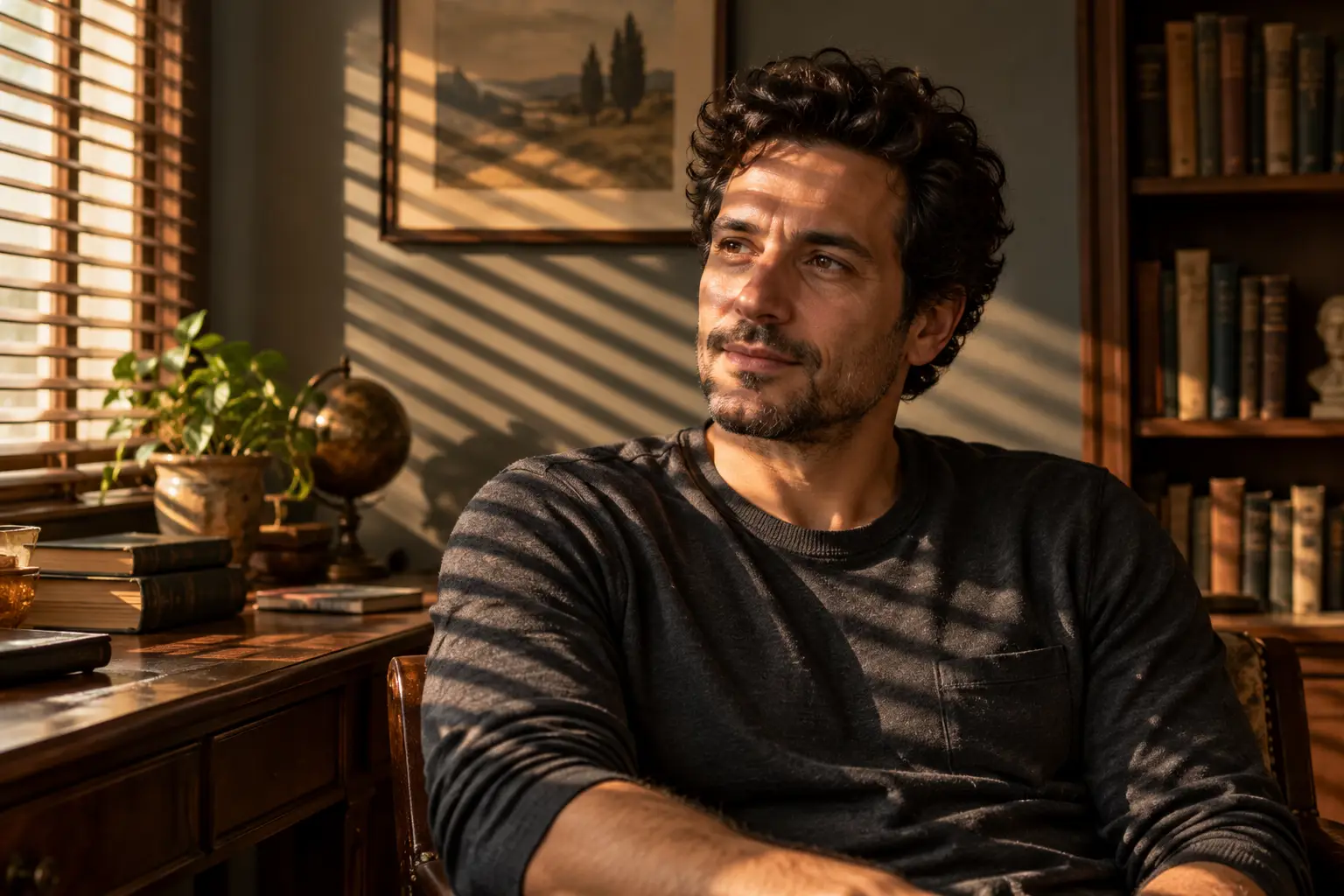
- Venetian blinds: “Project narrow, crisp horizontal bands from window blinds across the face and wall, with warm side light and gentle fill.” This is the generated example below.
- Fluorescent: “Use cool, flat overhead office light with a slight green cast and soft shadows; keep skin tones believable.” Good for a mundane workplace or institutional mood.
- Candlelight: “Light the face with a small warm source below and to one side, with quick falloff into a dim background.” Add a candle in the scene only if you want that object shown.
- Coloured gels: “Use a magenta key from frame left and a cyan edge from frame right, separating both colours on the background.” State the two colours and where they come from to avoid an undefined neon wash.
- Flashlight: “Use one narrow handheld beam from low frame right, lighting part of the face and leaving the rest in controlled shadow.” A flashlight is a focused light source; the model may still invent the device unless you say it is outside the frame.
- Clamshell: “Use a soft light above the camera and a weaker reflector below it for even facial fill and gentle shadows under the nose and chin.” This is a studio portrait setup; name the visible effect as well as the term.
- Sodium-vapour: “Use a strong amber-orange streetlight from above, with dark surroundings and a little neutral fill on the eyes.” It suggests a night street; check that the image does not turn every surface orange.
- Underlighting: “Place a small warm source below the chin, creating upward shadows while keeping the face recognisable.” It can look eerie; describe the mood you want so the result is not accidentally horror-coded.
- Practicals: “Let a visible table lamp in the background motivate a warm pool of light on one side of the face; keep the lamp shade in frame.” In film language, a practical is a light source that appears in the scene.
- Rim light: “Keep the face softly lit from the front and add a narrow bright edge along the hair and shoulder from behind.” Useful for separating a dark subject from a dark background.
- Firelight: “Use an uneven, flickering-looking amber glow from below and frame left, with the rest of the room dim.” The prompt suggests the appearance of firelight; it does not model a physically accurate flame.
Two additional setups to try
These last two ideas are our additions; they were not readable as labels in the reel.
- North-window softness: “Use broad, cool daylight from a large window at frame left, producing soft cheek shadows and a calm neutral background.” This is a useful baseline when you want detail without hard contrast.
- Warm key with cool fill: “Light the face with a soft amber key from frame right and a very faint blue fill from frame left; keep the background neutral.” The two temperatures can add separation without turning the portrait into a two-colour effect.
A simple way to compare them
- Write a short base description: subject, setting, pose, clothes, framing and visual medium.
- Choose one lighting setup and describe its direction, softness or hardness, colour and shadow pattern.
- Generate the image. Check whether the face is readable, the shadows land where you asked, and the scene stayed consistent.
- Change only the lighting sentence for the next version. Save each prompt beside its output so you can tell what you changed.
- If the tool supports image editing, provide the previous image as a reference and explicitly say what must remain unchanged. Inspect identity, pose and background for drift; an edit prompt is guidance, not a pixel-lock.
OpenAI’s image-prompting guidance recommends describing visible details such as lighting, colour and framing, separating requested changes from details to preserve, and refining one change at a time. That approach makes it easier to identify why a result changed.
What to check in the result
Look at the face first. A dramatic colour cast is not useful if it hides the eyes; a rim light should outline the subject rather than replace the key light; and a “high key” request still needs enough contrast to show shape. Also check whether the model changed the room, added a visible lamp or candle, or altered clothing while you were trying to change light.
Lighting vocabulary is a starting point, not a control panel. Image generators may interpret studio terms differently, and the same prompt can produce different compositions. If a term fails, describe the light source and the visible result in ordinary language. For example: “large soft source above the camera, very gentle shadow under the chin” is more actionable than “beauty lighting” by itself.
Generated example: Venetian-blinds light
The image shows an invented adult in a reading room, with warm window light forming diagonal bands across the face, shirt and wall. The result follows the requested lighting, while adding bookshelves, a desk and a framed landscape that the prompt did not require. That is a useful reminder to review the whole image, not just the effect you set out to test.
Try the reusable prompt
Open the portrait lighting study prompt to copy the template and adjust the subject, setting and lighting description. Its Venetian-blinds example was generated and reviewed; the other suggested lighting changes have not been run individually.
Source and disclosure
The idea was inspired by the ai.volve.news Instagram reel. We watched the 15.9-second muted clip and read 18 lighting names; two numbered entries remained blank. The full guide mentioned in its caption was not available to inspect. The examples and explanations here were written independently, and no Instagram image or frame was reused.
OpenAI’s documentation describes prompting image generation by specifying the intended result, visible details, lighting and composition; it also recommends deliberate iteration for edits. Adobe’s portrait-photography guide discusses balancing flash with the background and using warm, soft light. These sources inform the practical explanation, not a claim that every image model responds identically.
Editorial disclosure: AI tools assisted with research, drafting and the separate editorial revision. The article’s portrait illustration was generated for this guide. There is no sponsorship, affiliate relationship or supplied product.
Sources
Image prompting | OpenAI API — OpenAI
Images in ChatGPT — OpenAI Help Center
Portrait lighting study prompt — Techotick Prompt Library