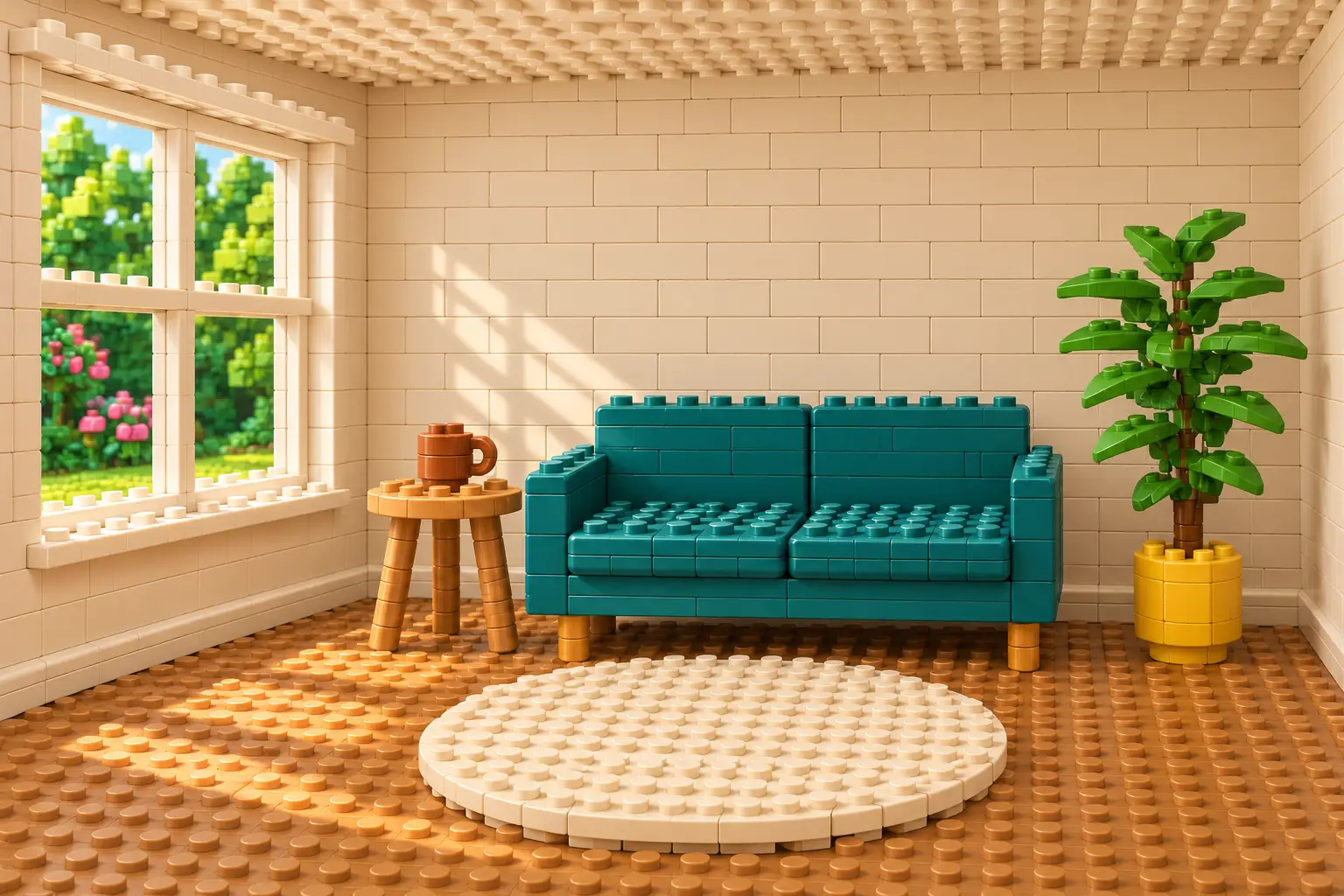
A familiar room rebuilt from toy bricks is more interesting when you can still recognize the room. The challenge is to change its material without losing the window, furniture arrangement or viewpoint that identify the original scene. A one-word style label leaves those decisions open.
This guide separates three kinds of transformation, then follows one reference-based edit from a synthetic reading corner to a toy-brick world. The example is a recorded image-generation run, not evidence of a physical model, a camera capture or repeatable results across tools.
Choose what is allowed to change
Write two short lists before generating: the features that define the scene, and the features that may be reimagined. For our room, the window stays on the left, the sofa stays at center-right, and the table, plant and rug retain their relative positions. Upholstery, wood grain and plaster are allowed to become constructed surfaces.
That distinction keeps the preservation request specific. A sofa cannot remain visually identical and also become a pile of plastic bricks. Preserve its placement, silhouette and color instead. If you need an accurate record of a real room or product, retain the original separately; a generated transformation is an illustration.
Three families of scene transformation
Scale changes alter the relationship between objects. Tiny people beside a cup, one oversized object in a city and a tabletop miniature all need different size cues. Decide which object establishes scale and whether the original camera view should change.
Material changes rebuild the existing shapes. Toy bricks, folded paper, candy and ice benefit from visible construction details: studs and seams, layered edges, sugar texture or translucent frozen surfaces. Choose one material logic for the whole scene so it reads as a coherent world.
Environment changes change the story around the objects. An underwater street, an abandoned city and a future city require different lighting, surface wear and surroundings. These are larger redesigns, so decide which landmarks matter more than preserving every detail.
Ten directions to adapt
These are writing suggestions, not ten tested presets. The toy-brick example below is the only transformation run for this guide.
- Tiny people: describe their task and size relative to one familiar object. Check that hands, tools and contact with the surface make sense.
- One giant object: name the object that grows, what remains normal-sized and where its base touches the ground. Keep the surrounding scene readable.
- Miniature model: request a tabletop base, model-scale details and a deliberate viewing angle. A higher viewpoint changes the composition; allow it explicitly if that is your aim.
- Abandoned world: specify weathering, plants and empty space rather than simply asking for destruction. Keep a few landmarks so the location remains identifiable.
- Ice world: say which surfaces become ice, where snow settles and whether the palette should remain recognizable. Inspect reflections and object edges.
- Underwater world: define the water color, light direction and restrained marine details. Decide whether the scene is submerged or seen through a separate aquarium-like enclosure.
- Candy world: assign materials to objects, such as biscuit walls and chocolate floor tiles. If every surface becomes a different sweet, the layout may become harder to read.
- Future world: name a few specific changes, such as transit structures or building surfaces. A future setting is fictional design, not a forecast or product announcement.
- Toy-brick world: ask for joined blocks, visible studs and tiled edges across the scene. Treat the image as a construction-inspired illustration, not a parts list.
- Paper world: describe layered cut edges, folded planes and shadows between sheets. For a new illustration without a reference, the visual-style prompt already includes a recorded papercraft example.
A worked example: rebuild a reading corner
We generated the reference below specifically for this guide. It contains a teal sofa, a four-pane window, one side table with an open mug, a plant in a yellow pot and a circular rug. The small object list makes it possible to judge what survived the edit.
The next request attached that exact image and asked for a whole-room toy-brick reconstruction. OpenAI's image-generation guidance describes attaching references and stating what should change and stay. Its image-prompting guide also recommends checking the result and making focused refinements. Those are useful working methods, not a promise of exact preservation.
Synthetic room reference — AI-generated
An invented reading corner created for this example. It is not a photograph of a real home.
Toy-brick reconstruction — AI-generated
An edit of the displayed synthetic reference. The main layout remains recognizable, while surfaces and fine geometry change. No physical construction was built.
Exact transformation prompt used
Use the attached image as the scene reference and edit target. Rebuild the entire visible room as a miniature set made from unbranded interlocking plastic toy bricks. Keep the camera position, perspective, crop, room proportions and the relative size and placement of the four-pane window on the left, teal two-seat sofa at center-right, round side table and terracotta mug to its left, leafy plant in the yellow pot at far right, and circular cream rug in front. Translate every visible material into small studded bricks, flat tiles and clearly joined block-built shapes: the wall, floor, sofa, table, mug, plant leaves, window frame and rug should all visibly belong to the same constructed world. Preserve the teal, cream, warm oak, terracotta, mustard and green palette and the soft daylight direction from frame left. Allow material and surface detail to change, while keeping the scene recognizable. Return one landscape 3:2 image. Do not add people, new furniture, words, logos, brand marks, watermarks, labels, borders or split panels. This is a generated transformation of a synthetic reference, not a photograph of a physical construction or a buildable toy design.
What held, and what changed
The window remains on the left; the teal sofa, table, plant and pale rug keep their broad arrangement. Studs, tiles and block-built edges make the material change visible across the room. The palette and daylight direction also remain recognizable.
The edit does more than substitute texture. The open mug gains a lid-like studded top; the plant's branch structure, table details and sofa surfaces change. The ceiling becomes visibly studded. These differences are why a convincing style does not establish an exact match to the reference. We did not run a corrective follow-up or a second material variation.
Use the reference-scene transformation prompt (IMG017) to edit the material treatment, layout anchors, construction details and palette. To reproduce this particular example, attach the displayed synthetic reference and retain the defaults. A different reference is a new, untested case.
Review the scene before sharing it
Compare the source and result side by side at the same size. Start with the few features you named as fixed; a quick overall impression can hide a moved doorway or a missing object.
- Layout: check the positions, relative sizes, camera height and crop of the important objects.
- Inventory: count the furniture, props and people that should remain. Look for additions such as the lid in our example.
- Material: inspect several surfaces, not just the central object. Check whether joins, folds or transparent areas suit your chosen treatment.
- Light and contact: look at shadows, reflections and where objects meet the floor. A floating table leg can undermine an otherwise convincing scene.
- Purpose: label the result as generated concept art. Do not present invented construction, damage, renovations or product features as documentary evidence.
If one detail fails, request one correction and repeat the layout details that must remain. Reattach the original when it is needed to make the comparison clear. For the mug above, a possible follow-up is to restore an open cup without changing the rest of the brick scene; that correction has not been tested.
Keep an approved source and each accepted result as separate files. For local additions that should leave most of a photo alone, use the uploaded-photo effect prompt instead of requesting a whole-world rebuild.
Before you generate
Editorial disclosure: AI tools assisted with research, drafting, image generation and a separate editorial revision. Both displayed images are generated; the second was edited from the first. No sponsorship, affiliate links, supplied products or paid promotions are involved.
Sources
- Image generation — OpenAI ChatGPT Learn
- Image prompting — OpenAI API documentation